Non-alcoholic mode
Zero-proof drinking is a first-class citizen in Riffed, not a filter bolted on at the end. The catalog carries real non-alcoholic drinks, N/A spirits, teas, and shrubs as proper ingredients with their own flavor profiles — and a mode that reorients the whole app around them.
N/A mode
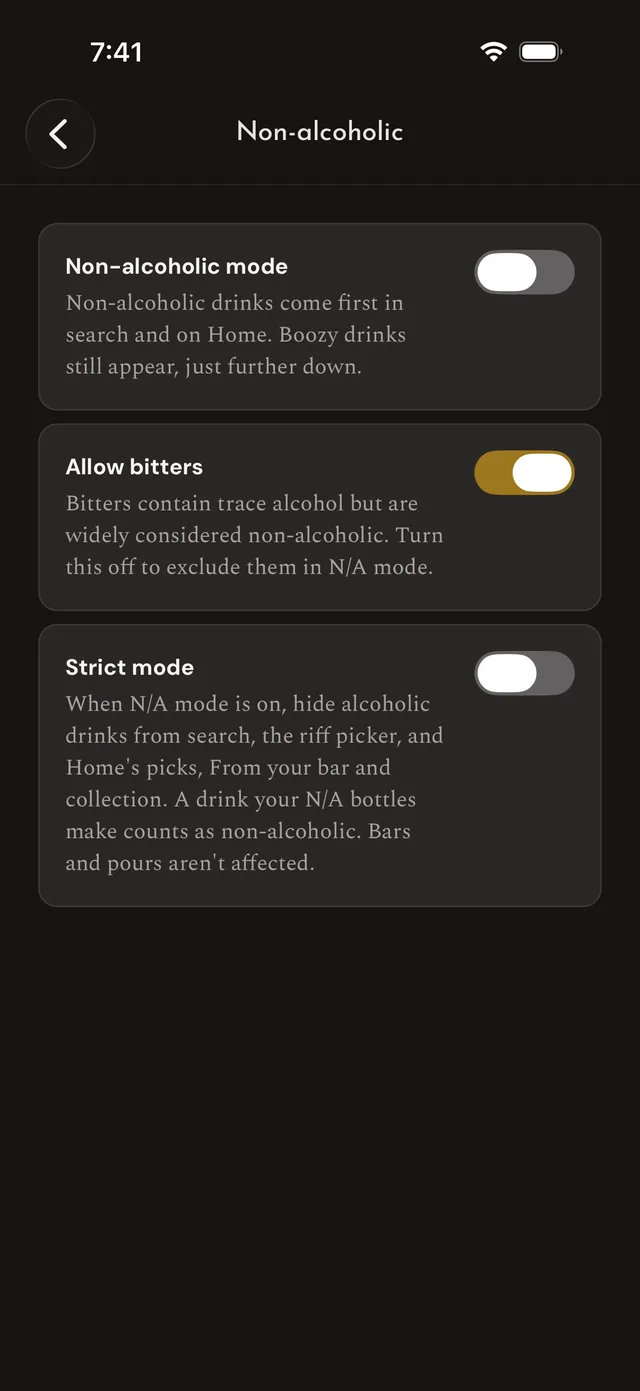
Flip it on in Settings → Non-alcoholic, or tap Turn on N/A mode on any non-alcoholic drink's page. A "Non-alcoholic mode" row on Home and an "N/A mode" chip in Search remind you it's on, and either opens the settings. The row's ✕ only hides it for this session — the mode stays on — and the chip isn't a filter you chose, so it never counts toward "Filters". With it on:
- Non-alcoholic drinks come first. Search opens with them on top, and a typed search lifts them above comparable boozy matches (a drink you name outright still leads). On Home, Tonight's Picks and From your bar favor them, the Collection row becomes "Zero-proof picks", and Explore opens on its Zero-proof pill. Your palate screen's recommendations lead with them too, with an N/A pill beside the spirit pills. Boozy drinks aren't hidden — they sit further down, and fill in where there aren't enough zero-proof ones.
- Picking ingredients skips the alcohol. The riff editor's ingredient browser hides the alcoholic aisles — spirits, liqueurs, wine, beer, vermouth, amari. Add to Bar keeps everything but lists the zero-proof choices first, since a bar can hold alcohol for guests.
- Your bar thinks in zero-proof — see Your N/A bar.
Charts, riffing, and the shape of your palate work the same as ever. One Search shortcut: typing "mocktail", "zero proof", or "alcohol-free" turns on the Non-alcoholic filter (the one under Show in the filter menu) as a chip you can remove, instead of searching for those words as drink names. Unlike N/A mode on its own, that filter leaves alcoholic drinks out of the search.
Strict mode
N/A mode prioritizes; strict mode excludes. With it on, alcoholic drinks and ingredients are left out of Search, alcoholic drinks are left out of the riff picker and Home's picks, From your bar, and Collection, and your palate's recommendations are zero-proof only. On Home, a drink your N/A bottles make counts as non-alcoholic, so it stays. Your bar, your pours, and Explore's spirit and family pills aren't affected. Use it when "mostly zero-proof" isn't the assignment.
The bitters question
A dash of Angostura is technically a trace of alcohol — which is why a bitters-laced drink isn't strictly zero-proof, and why every N/A menu on earth quietly argues about it. Riffed doesn't decide for you: Allow bitters is on by default, so bitters count as acceptable in your N/A world. Turn it off and a drink with bitters stops counting as non-alcoholic (an optional dash you can leave out doesn't count): Search, Home's picks, From your bar, and your palate's recommendations stop putting it first, strict mode leaves it out of them and the riff picker, and the Zero-proof picks row and Explore's Zero-proof pill drop it. Make N/A looks for a stand-in for the bitters like for any other alcoholic ingredient.
Converting a drink
Plenty of classics convert beautifully, and Riffed knows which ones:
- In Search with N/A mode on, an alcoholic drink that converts cleanly — every ingredient already zero-proof or with a stand-in — carries an "N/A Ready" badge.
- With N/A mode on, an alcoholic drink's page carries Make N/A, with a word beside it: Easy when every ingredient is already zero-proof or has a stand-in, Moderate when at least three-quarters do, Difficult when fewer. Tap the word for what it means.
- Make N/A proposes a full conversion before anything changes — each alcoholic ingredient swapped for its zero-proof stand-in, a verdict (Good, Acceptable, or Difficult), and how close the flavor lands. An ingredient with no stand-in is called out and left as it is for you to deal with, and a drink with even one of those always reads Difficult.
- Confirming hands you the converted drink in the riff editor, where it's yours to adjust like anything else. A banner says what you're converting and how similar it is, and the chart's overlay button can lay the original's flavor shape over yours, so you can see what the conversion keeps and what it trades away. It saves as its own drink, linked to the original.
Your N/A bar
Stock N/A spirits, teas, syrups, and shrubs in your bar like any other bottle; N/A spirits get their own group on the Bar screen, right after your spirits.
In N/A mode your N/A bottles also count as the alcoholic ingredient they stand in for — N/A Gin, N/A Bitter Aperitivo, and N/A Sweet Vermouth make a Negroni — so "what can I make tonight?" has a real zero-proof answer on the Home masthead and the Bar screen. "1–2 away" keeps only the drinks N/A bottles can finish, and "Add one bottle" names N/A bottles and never alcohol: a drink short of gin credits N/A Gin. On an alcoholic ingredient's page, its N/A stand-in — the one you own, if you own one — leads the Similar rail.